Curbside Pickup
15 minute read
Imagine a store running curbside pickup. The retail team manages customer orders in one database and marks an order ready when it’s prepared. Independently, the physical operations team tracks pickup vehicles in another database, and a driver sets their location to Curbside when they arrive. The two systems never talk to each other.
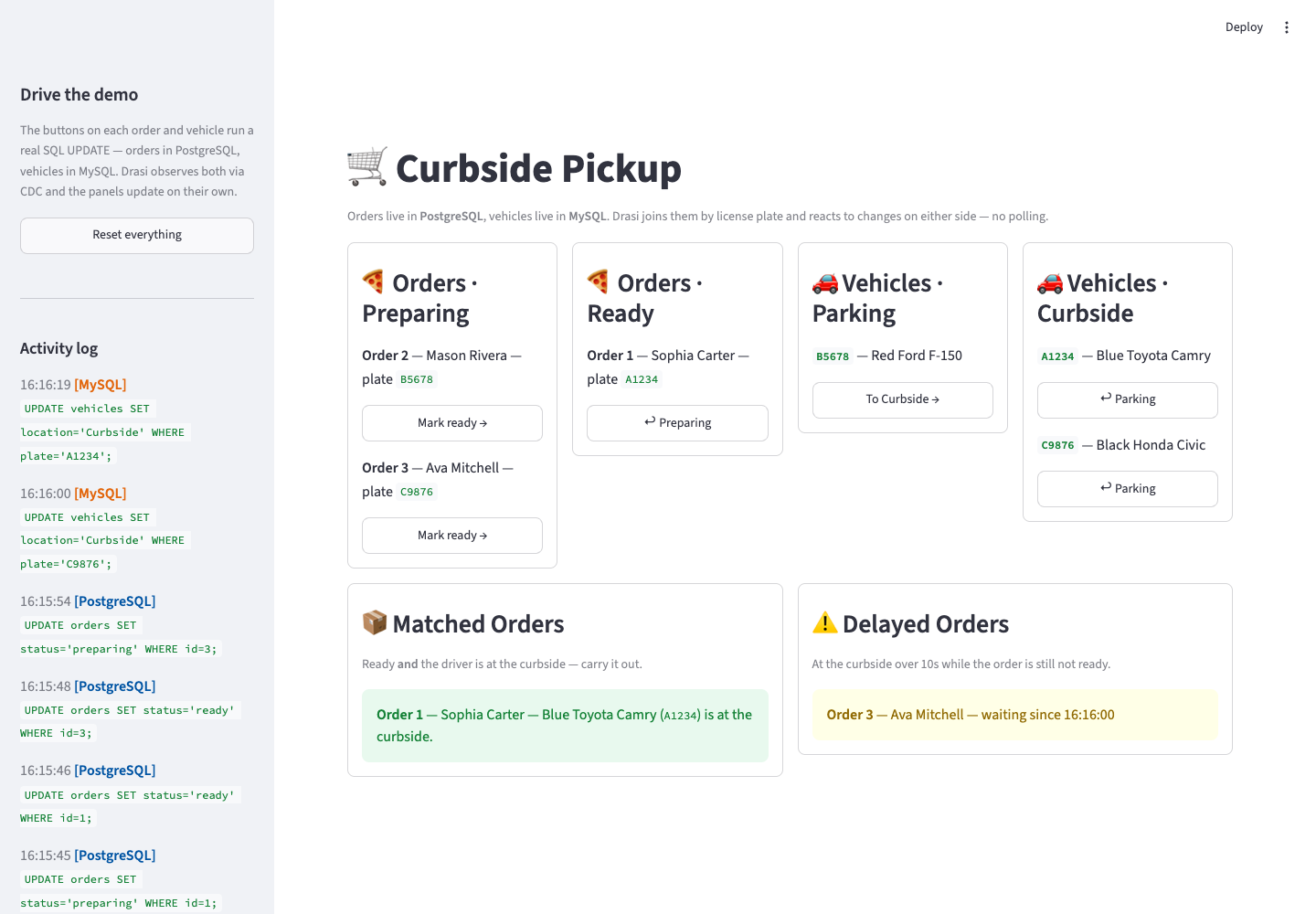
You want a single live view with six panels:
- an Orders · Preparing panel and an Orders · Ready panel, so an order visibly moves from one to the other the moment it’s marked ready,
- a Vehicles · Parking panel and a Vehicles · Curbside panel, so a car moves between them as the driver pulls up, plus the two situations that matter:
- a Matched Orders panel that lights up the instant an order is ready and its driver is at the curbside, so staff know exactly which order to carry out, and
- a Delayed Orders panel that flags drivers who have been waiting at the curbside too long while their order still isn’t ready.
The catch: the orders live in PostgreSQL and the vehicles live in MySQL, and what you care about — a ready order whose driver has arrived — only exists when you combine a fact from each. Building this the traditional way means polling both databases, and you always end up reactive on one side and blind, between polls, on the other. This tutorial builds it with drasi-lib instead: two sources, six continuous queries (two of which join across both databases), and a Python reaction that renders one Streamlit UI. Drasi watches the change feed of both databases at once, so a change on either side re-evaluates the join immediately — no polling, no blind side. And rather than a separate dashboard plus a separate console, the one Streamlit page both shows the six panels and has the buttons that drive the changes.
| Step | What You’ll Do |
|---|---|
| Step 1: Set Up Your Environment | Open the dev container (or install Python + Docker locally) |
| Step 2: Run the Demo | One command starts both databases and the Streamlit app |
| Step 3: Open the UI | Watch all six panels update live |
| Step 4: Drive Change | Use the buttons in the UI to change orders and vehicles, and watch Drasi react |
| How It Works | Understand the two sources, the cross-database join, and the six queries |
- One process: the Streamlit app embeds the Drasi engine, so a single command runs everything. It stays in the foreground and you drive changes from your browser.
- Working directory: run every command from the tutorial directory (
tutorials/curbside-pickup/). The dev container opens there automatically; if you’re running locally,cd tutorials/curbside-pickupfirst. - Command tabs: commands are shown in tabs (bash / zsh and PowerShell). Use the one for your shell. The dev container and Codespaces use bash.
- Ports: the Streamlit UI is on
8501, PostgreSQL is published on5742, and MySQL on3309.
Step 1 of 4: Set Up Your Environment
This tutorial needs Docker (it runs PostgreSQL and MySQL) and Python 3.10+. The easiest way to get everything is the dev container.
Option A: Dev Container or GitHub Codespaces (recommended)
VS Code (local dev container)
- Open the
drasi-pythonrepository in VS Code. - Run Dev Containers: Reopen in Container.
- When prompted for a configuration, choose Curbside Pickup Tutorial (Python).
- Wait for the container to finish. Its setup script installs the tutorial’s Python dependencies and the Docker tooling for the two databases.
GitHub Codespaces
The default Create codespace button does not ask which configuration to use. Pick the tutorial config explicitly:
- On the
drasi-pythonrepo page, open the green Code menu and select the Codespaces tab. - Open the
...menu next to Create codespace on … and choose New with options…. - Under Dev container configuration, select Curbside Pickup Tutorial (Python), then create the codespace.
- Wait for the container to finish. Its setup script installs the tutorial’s Python dependencies and the Docker tooling for the two databases.
That’s it. Skip ahead to Step 2.
Option B: Run Locally
You’ll need Python 3.10+, Docker, and bash for the helper scripts (on Windows use Git Bash or WSL, or run the PowerShell scripts). From the repository root, move into the tutorial directory and install the dependencies:
cd tutorials/curbside-pickup
python3 -m venv .venv && source .venv/bin/activate
pip install -r requirements.txt
cd tutorials/curbside-pickup
python -m venv .venv; .venv\Scripts\Activate.ps1
pip install -r requirements.txtdrasi-lib ships as a prebuilt wheel, so no Rust toolchain is needed. It downloads the Postgres and MySQL plugins it needs from ghcr.io/drasi-project the first time the app runs.
Step 2 of 4: Run the Demo
Start the demo:
bash scripts/start-demo.shpowershell -ExecutionPolicy Bypass -File scripts/start-demo.ps1The start-demo script does two things:
- Starts both databases. PostgreSQL comes up with logical replication enabled and the
orderstable seeded (three orders, all preparing). MySQL comes up with ROW-based binary logging and GTID mode enabled and thevehiclestable seeded (three vehicles, all Parking) — the plates match the orders. - Launches the Streamlit app, which embeds the Drasi engine.
On first start, the app’s embedded engine downloads the plugins it needs (source/postgres, bootstrap/postgres, source/mysql, bootstrap/mysql) from ghcr.io/drasi-project, connects to both databases, bootstraps the existing rows, starts the six continuous queries, and registers the reaction. Streamlit prints a URL like the following when it’s ready:
Local URL: http://localhost:8501
Leave this running. Everything else happens in your browser.
Press Ctrl+C in the terminal to stop the app. To remove the database containers when you’re completely done, run bash scripts/cleanup.sh (bash) or powershell -ExecutionPolicy Bypass -File scripts/cleanup.ps1 (PowerShell). Add --volumes (bash) or -RemoveVolumes (PowerShell) to also delete the data.
Step 3 of 4: Open the UI
The app renders everything from the Python reaction — there’s no separate dashboard server and no separate console. Wait until the app has finished starting (the first run takes a little longer while the plugins download), then open it in your browser:
http://localhost:8501
In the dev container or Codespaces, port 8501 is forwarded automatically. You’ll see the Curbside Pickup UI with six panels:
- 🍕 Orders · Preparing and 🍕 Orders · Ready — every order in PostgreSQL, split by status. Each row has a button to move it.
- 🚗 Vehicles · Parking and 🚗 Vehicles · Curbside — every vehicle in MySQL, split by location. Each row has a button to move it.
- 📦 Matched Orders — orders that are ready whose driver is at the Curbside (the
deliveryquery). - ⚠️ Delayed Orders — drivers who have waited at the curbside for more than 10 seconds while their order is still being prepared (the
delayquery).
At bootstrap all three orders are preparing and all three vehicles are in Parking, so those two panels list every row while their Ready and Curbside counterparts start empty. The Matched and Delayed panels also start empty and fill in as you drive changes. The sidebar has a Reset button and a live, color-coded activity log of the SQL each button runs.
Step 4 of 4: Drive Change
Each button on an order or vehicle runs a single SQL UPDATE — orders in PostgreSQL (via psycopg), vehicles in MySQL (via PyMySQL) — exactly what a real retail or physical-operations app would run. There’s no API to call and no event to publish. Drasi observes the PostgreSQL change through logical replication and the MySQL change through the binary log, re-evaluates the affected queries (including the cross-database join), and calls the Python reaction, which updates the panels. The sidebar’s activity log shows each statement and which database it hit.
Trigger a delivery
In the 🍕 Orders · Preparing panel, press Mark ready → on order 1 (Sophia Carter). It immediately leaves Preparing and appears in 🍕 Orders · Ready. Now, in the 🚗 Vehicles · Parking panel, press To Curbside → on vehicle A1234.
The vehicle jumps to 🚗 Vehicles · Curbside, and within about a second the 📦 Matched Orders panel reacts: order 1 appears with its driver and vehicle. Nothing polled anything — Drasi saw the PostgreSQL change and the MySQL change and re-evaluated the cross-database join. Send the vehicle back with ↩ Parking and the row disappears from Matched Orders.
Trigger a delay
Now reproduce the other scenario. Pick a vehicle whose order is not ready — say B5678 (Mason Rivera) — and press To Curbside →, but leave order 2 as preparing. Nothing happens immediately. After 10 seconds the ⚠️ Delayed Orders panel lights up: order 2 appears, flagging that the driver has been waiting too long.
This is the interesting one. Drasi doesn’t poll to find slow orders — the continuous query schedules its own future re-evaluation for the moment the 10-second threshold is crossed, and fires exactly then. If you mark the order ready (or send the driver back to Parking) before the 10 seconds elapse, the alert never appears.
Reset
Press Reset everything in the sidebar to return to the starting state (all orders preparing, all vehicles Parking).
How It Works
The demo is two files in tutorials/curbside-pickup/: engine.py holds the two sources, the six queries, and the CurbsideEngine (its Python reaction and the SQL writes); app.py renders the reaction’s state and hosts the controls. The complete engine.py is at the end.
Two Sources
The queries join data from two different databases, so the engine adds two sources. Installing the plugins and adding the sources is a few lines of Python:
for plugin in ("source/postgres", "bootstrap/postgres", "source/mysql", "bootstrap/mysql"):
    await drasi.install_plugin(plugin)
await drasi.start()

# PostgreSQL holds the orders and streams changes via logical replication (CDC).
await drasi.add_source(
    "postgres",
    "retail-ops",
    {
        **POSTGRES,
        "sslMode": "prefer",
        "tables": ["public.orders"],
        "tableKeys": [{"table": "orders", "keyColumns": ["id"]}],
        "slotName": "drasi_curbside_slot",
        "publicationName": "drasi_curbside_pub",
    },
    bootstrap={"kind": "postgres", **POSTGRES},
)

# MySQL holds the vehicles and streams changes via its binary log (binlog).
await drasi.add_source(
    "mysql",
    "physical-ops",
    {
        **MYSQL,
        "sslMode": "disabled",
        "tables": ["vehicles"],
        "tableKeys": [{"table": "vehicles", "keyColumns": ["plate"]}],
    },
    bootstrap={
        "kind": "mysql",
        **MYSQL,
        "tables": ["vehicles"],
        "tableKeys": [{"table": "vehicles", "keyColumns": ["plate"]}],
    },
)
The MySQL container is started with ROW-based logging, full row images/metadata and GTID mode (see database/docker-compose.yml), and database/mysql-init.sql grants the Drasi user the replication privileges it needs to read the binlog. Each table row becomes a graph node: orders rows become (o:orders) and vehicles rows become (v:vehicles).
The Synthetic Join
There is no foreign key between the two databases — they’re completely separate systems. Drasi creates the relationship in the query with a synthetic join, matching a vehicle to an order whenever their plate values are equal. The delivery and delay queries read from both sources and declare this join dict in their joins list:
{
    "id": "PICKUP_BY",
    "keys": [
        {"label": "vehicles", "property": "plate"},
        {"label": "orders", "property": "plate"},
    ],
}
With that declared, the query walks (o:orders)-[:PICKUP_BY]->(v:vehicles) as if it were a real graph edge — across two different databases.
The Six Continuous Queries
Four are simple single-source lists, filtered by state, that feed the split Orders and Vehicles panels — because each matches only part of a table, a row leaves one query’s result and joins the other’s the instant its status or location changes:
MATCH (o:orders)
WHERE o.status <> 'ready'          // orders-ready uses: o.status = 'ready'
RETURN o.id AS id, o.customer_name AS customerName, o.plate AS plate
The other two join across both databases. delivery returns an order whenever it is ready and its driver’s vehicle is at the Curbside:
MATCH (o:orders)-[:PICKUP_BY]->(v:vehicles)
WHERE o.status = 'ready' AND v.location = 'Curbside'
RETURN o.id AS id, o.customer_name AS customerName, o.plate AS vehicleId, v.make AS vehicleMake
delay returns an order whose driver has been at the Curbside for more than 10 seconds while the order still isn’t ready. It uses drasi.trueFor, which schedules a future re-evaluation and fires the moment the condition has held for the given duration, so the order appears exactly when the 10-second threshold is crossed:
MATCH (o:orders)-[:PICKUP_BY]->(v:vehicles)
WHERE o.status <> 'ready'
  AND drasi.trueFor(v.location = 'Curbside', duration({ seconds: 10 }))
RETURN o.id AS orderId, o.customer_name AS customerName,
drasi.changeDateTime(v) AS waitingSinceTimestampBoth the PostgreSQL and MySQL sources stamp every change with the wall-clock time it happened, which drasi.changeDateTime() exposes. drasi.trueFor uses that timestamp to anchor its 10-second timer — so the delay query fires exactly when a curbside vehicle has waited long enough — with no extra timestamp columns or application bookkeeping. The delivery query uses drasi.listMax([drasi.changeDateTime(o), drasi.changeDateTime(v)]) to report whichever of the two changes happened later.
The Python Reaction
A single Python reaction subscribes to all six queries. Each time a query’s result set changes — including the delayed re-evaluation the delay query schedules — Drasi calls it with the query id and the diffs, and the callback updates a thread-safe snapshot the UI reads:
def on_results(event):
    query = QUERIES_BY_ID[event["query_id"]]
    with lock:
        store = snapshot[query.id]  # this query's rows, keyed by id
        for diff in event["results"]:
            match diff:
                case {"type": "DELETE", "data": dict() as row}:
                    store.pop(row[query.key], None)
                case {"after": dict() as row} | {
                    "data": dict() as row
                }:  # ADD / UPDATE / aggregation
                    store[row[query.key]] = row


await drasi.add_python_reaction("ui", [q.id for q in QUERIES], on_results)
One integrated Streamlit UI
The engine runs on its own asyncio event loop in a background daemon thread, created once with @st.cache_resource, and app.py reads engine.snapshot() each run and renders the six panels with a ~1-second auto-refresh. Because it’s the same page, the panels can also drive the demo: each order and vehicle row has a button that runs the matching UPDATE, the sidebar has a Reset button, and every write is appended to the activity log the sidebar shows. A delay row appearing 10 seconds after you move a vehicle to the curbside is the reaction receiving drasi.trueFor’s scheduled re-evaluation — live, with no polling.
Putting It All Together
The sections above walked through the Drasi side one piece at a time. Here it is assembled into the single engine.py — the two sources, the synthetic join, the six queries, and the CurbsideEngine that runs them and writes back. app.py (the Streamlit UI) imports CurbsideEngine and the query ids from it:
import asyncio
import os
import threading
import time
from collections import deque
from dataclasses import dataclass, field
from typing import Any

os.environ.setdefault("RUST_LOG", "warn")  # quiet the engine's INFO logging

import psycopg
import pymysql
from drasi import Drasi

# --- The two sources ---
POSTGRES = {
    "host": os.environ.get("POSTGRES_HOST", "localhost"),
    "port": int(os.environ.get("POSTGRES_PORT", "5742")),
    "database": os.environ.get("POSTGRES_DATABASE", "RetailOperations"),
    "user": os.environ.get("POSTGRES_USER", "drasi_user"),
    "password": os.environ.get("POSTGRES_PASSWORD", "drasi_password"),
}
POSTGRES_SOURCE_CONFIG = {
    **POSTGRES,
    "sslMode": "prefer",
    "tables": ["public.orders"],
    "tableKeys": [{"table": "orders", "keyColumns": ["id"]}],
    "slotName": "drasi_curbside_slot",
    "publicationName": "drasi_curbside_pub",
}

MYSQL = {
    "host": os.environ.get("MYSQL_HOST", "localhost"),
    "port": int(os.environ.get("MYSQL_PORT", "3309")),
    "database": os.environ.get("MYSQL_DATABASE", "PhysicalOperations"),
    "user": os.environ.get("MYSQL_USER", "drasi_user"),
    "password": os.environ.get("MYSQL_PASSWORD", "drasi_password"),
}
MYSQL_SOURCE_CONFIG = {
    **MYSQL,
    "sslMode": "disabled",  # the tutorial container has no TLS
    "tables": ["vehicles"],
    "tableKeys": [{"table": "vehicles", "keyColumns": ["plate"]}],
}
# Each source also takes a bootstrap config, and the UI writes through a psycopg
# (Postgres) and a PyMySQL (MySQL) connection built from the dicts above.

RETAIL_OPS, PHYSICAL_OPS = "retail-ops", "physical-ops"


@dataclass(frozen=True)
class Query:
    id: str
    key: str  # the RETURN column that identifies each row
    sources: list[str]
    cypher: str
    joins: list[dict] = field(default_factory=list)


QUERIES = [
    # Four single-source list queries split orders and vehicles by state. Each has
    # the same shape; orders-preparing is shown here, and orders-ready /
    # vehicles-parking / vehicles-curbside flip the WHERE clause.
    Query(
        id="orders-preparing",
        key="id",
        sources=[RETAIL_OPS],
        cypher="MATCH (o:orders) WHERE o.status <> 'ready' "
        "RETURN o.id AS id, o.customer_name AS customerName, o.plate AS plate",
    ),
    # delivery: an order is ready AND its driver's vehicle is at the curbside. The
    # synthetic join matches a vehicle to an order by equal plate, across databases.
    Query(
        id="delivery",
        key="id",
        sources=[RETAIL_OPS, PHYSICAL_OPS],
        joins=[
            {
                "id": "PICKUP_BY",
                "keys": [
                    {"label": "vehicles", "property": "plate"},
                    {"label": "orders", "property": "plate"},
                ],
            }
        ],
        cypher="""
        MATCH (o:orders)-[:PICKUP_BY]->(v:vehicles)
        WHERE o.status = 'ready' AND v.location = 'Curbside'
        RETURN o.id AS id, o.customer_name AS customerName, o.plate AS vehicleId
        """,
    ),
    # delay: at the curbside over 10s while the order is still not ready.
    Query(
        id="delay",
        key="orderId",
        sources=[RETAIL_OPS, PHYSICAL_OPS],
        joins=[
            {
                "id": "PICKUP_BY",
                "keys": [
                    {"label": "vehicles", "property": "plate"},
                    {"label": "orders", "property": "plate"},
                ],
            }
        ],
        cypher="""
        MATCH (o:orders)-[:PICKUP_BY]->(v:vehicles)
        WHERE o.status <> 'ready'
          AND drasi.trueFor(v.location = 'Curbside', duration({ seconds: 10 }))
        RETURN o.id AS orderId, o.customer_name AS customerName,
               drasi.changeDateTime(v) AS waitingSinceTimestamp
        """,
    ),
]


class CurbsideEngine:
    """Runs Drasi over two databases and exposes a thread-safe snapshot."""

    def __init__(self):
        self._lock = threading.Lock()
        self._results = {}  # query id -> {row key -> row}
        self._key_by_id = {q.id: q.key for q in QUERIES}
        self._activity = deque(maxlen=20)  # recent SQL writes for the sidebar
        self._ready = threading.Event()
        self._drasi = None
        # Run the engine on its own event loop in a background thread.
        threading.Thread(target=self._run, daemon=True).start()

    def _run(self):
        loop = asyncio.new_event_loop()
        asyncio.set_event_loop(loop)
        loop.run_until_complete(self._start())
        self._ready.set()
        loop.run_forever()

    async def _start(self):
        self._drasi = await Drasi.create("curbside-pickup")
        for plugin in ("source/postgres", "bootstrap/postgres", "source/mysql", "bootstrap/mysql"):
            await self._drasi.install_plugin(plugin)
        await self._drasi.start()

        await self._drasi.add_source("postgres", RETAIL_OPS, POSTGRES_SOURCE_CONFIG, bootstrap=...)
        await self._drasi.add_source("mysql", PHYSICAL_OPS, MYSQL_SOURCE_CONFIG, bootstrap=...)
        for q in QUERIES:
            await self._drasi.add_query(q.id, q.cypher, q.sources, joins=q.joins or None)
        for q in QUERIES:
            await self._drasi.wait_for_query(q.id)
            rows = await self._drasi.get_query_results(q.id)
            self._results[q.id] = {r[q.key]: r for r in rows}

        await self._drasi.add_python_reaction("ui", [q.id for q in QUERIES], self._on_results)

    def _on_results(self, event):
        key = self._key_by_id[event["query_id"]]
        with self._lock:
            store = self._results.setdefault(event["query_id"], {})
            for diff in event["results"]:
                match diff:
                    case {"type": "DELETE", "data": dict() as row}:
                        store.pop(row[key], None)
                    case {"after": dict() as row} | {"data": dict() as row}:
                        store[row[key]] = row

    def snapshot(self):
        with self._lock:
            return {
                "results": {q: list(s.values()) for q, s in self._results.items()},
                "activity": list(self._activity),
            }

    # set_order_status(id, status) writes to Postgres, set_vehicle_location(plate,
    # location) writes to MySQL, and reset() returns everything to the start.
    # Each records the SQL it ran in the activity log.
That’s the whole Drasi side in one file: two databases joined by plate, six continuous queries (one temporal), and a reaction that keeps a snapshot the UI renders and drives.
Clean Up
When you’re finished, stop the app with Ctrl+C in the terminal, then remove the database containers:
# Stop containers, keep data
bash scripts/cleanup.sh

# Stop containers and delete the data volumes
bash scripts/cleanup.sh --volumes
# Stop containers, keep data
powershell -ExecutionPolicy Bypass -File scripts/cleanup.ps1
# Stop containers and delete the data volumes
powershell -ExecutionPolicy Bypass -File scripts/cleanup.ps1 -RemoveVolumesWhat You Learned
- Sources connect Drasi to live data — here, two databases at once, PostgreSQL via logical replication and MySQL via the binary log.
- Continuous Queries with a synthetic join relate rows across those two databases (order ↔ vehicle by plate), and a temporal query (
drasi.trueFor) fires exactly when a condition has held long enough — no polling, no bookkeeping. - A Python reaction turned all six queries into one live UI, and because it’s a Streamlit page, the same UI hosts the controls that drive the changes — no dashboard reaction and no separate console.
- Because Drasi emits only what changed, every panel updates the instant the data does, whichever database changed.
From here, try changing the delay threshold, adding an order/vehicle, or pointing the sources at your own databases.
Feedback
Was this page helpful?
Glad to hear it! Please tell us how we can improve.
Sorry to hear that. Please tell us how we can improve.